zpres: presentations from textDRAFT
For ModRef 2026, I needed to give three presentations. This was apparently not enough of a deadline on its own, so I also decided to write a presentation system.
zpres 0.1.0 is the result. It is an open-source presentation builder. I write the slides and speaker notes in a Markdown-like .zp.md file, preview the talk in a browser, and publish it as interactive HTML or a PDF. Both come from the same source.
The project draws inspiration from reveal.js, the HTML presentation framework.
The talks cover a wedding seating problem, experiments on large Sudoku puzzles, and algorithms for selecting well-spaced points. I wanted the visual design of each talk to reflect its subject, while sharing the authoring format and presentation tools. With three talks at the same workshop, distinct visual styles also help give each one its own identity.
Designing for the content
No More Awkward Silences with Table Talk Tuning models a wedding seating problem. Alongside table capacities and requests to seat people together or apart, it considers whether each guest has a conversation topic shared by enough people at their table. Given that wedding setting, the Wedding theme is designed around invitations and table plans, with serif typography and botanical ornaments.
The slide below separates two questions: does the seating satisfy the practical requirements, and will the guests have something to talk about? The theme presents that comparison as two cards on a sheet of stationery, over a photograph of the reception room.
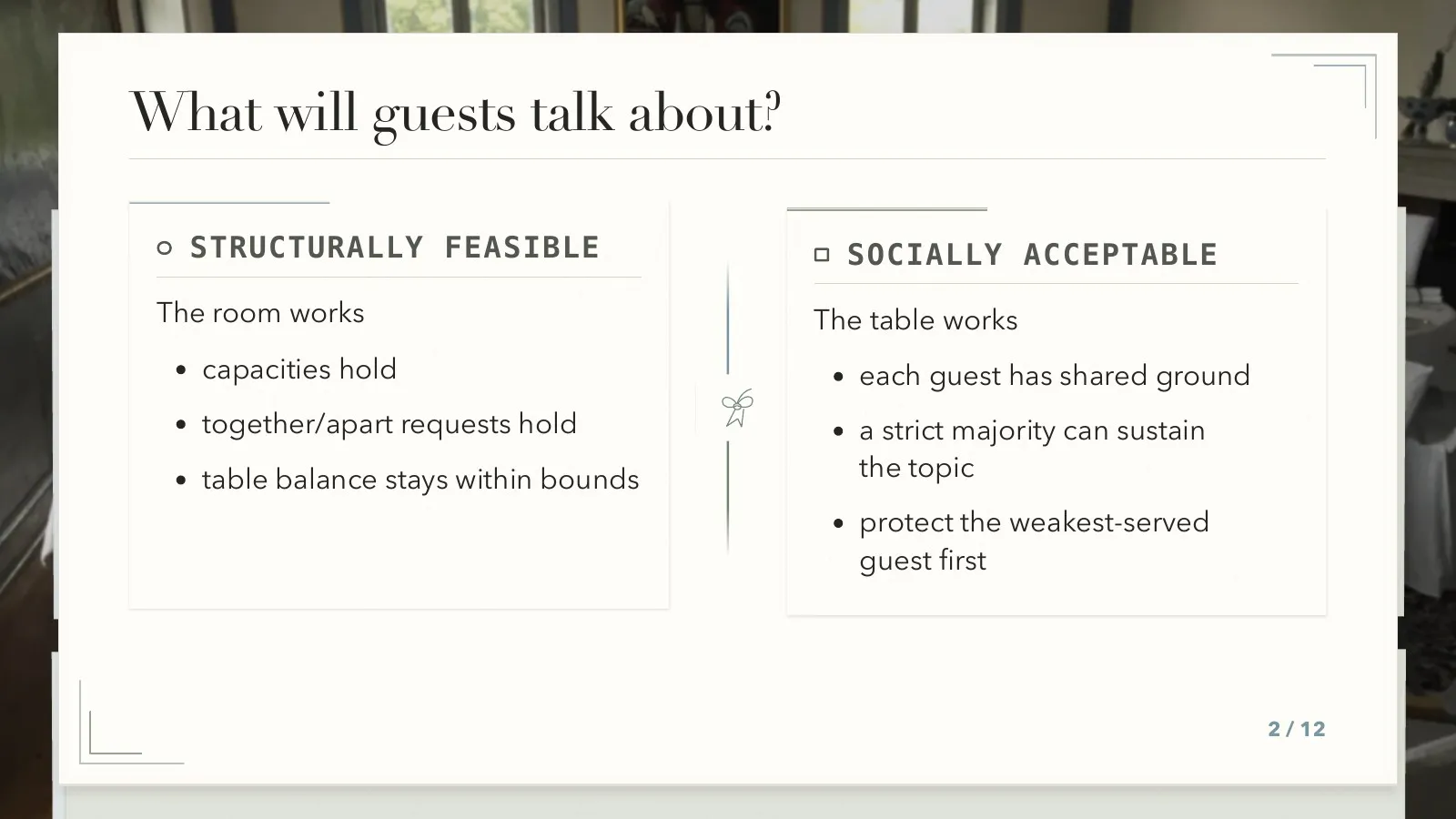
Table Talk Tuning: a comparison laid out as a pair of cards.
Scaling Sudoku as a Constraint Problem asks how Sudoku changes as the grid grows from 6×6 to 36×36. Using a corpus of 434,201 puzzles, it examines which instances can be solved by propagation alone and how that distribution changes with size. Paper Chalk gives this experimental study the appearance of a notebook, with ruled paper and margin marks.
The puzzle slides put each grid beside notes on its size, hardness, and generation time. Repeating that arrangement across grid sizes makes the growth visible while keeping the experimental information in a consistent place.
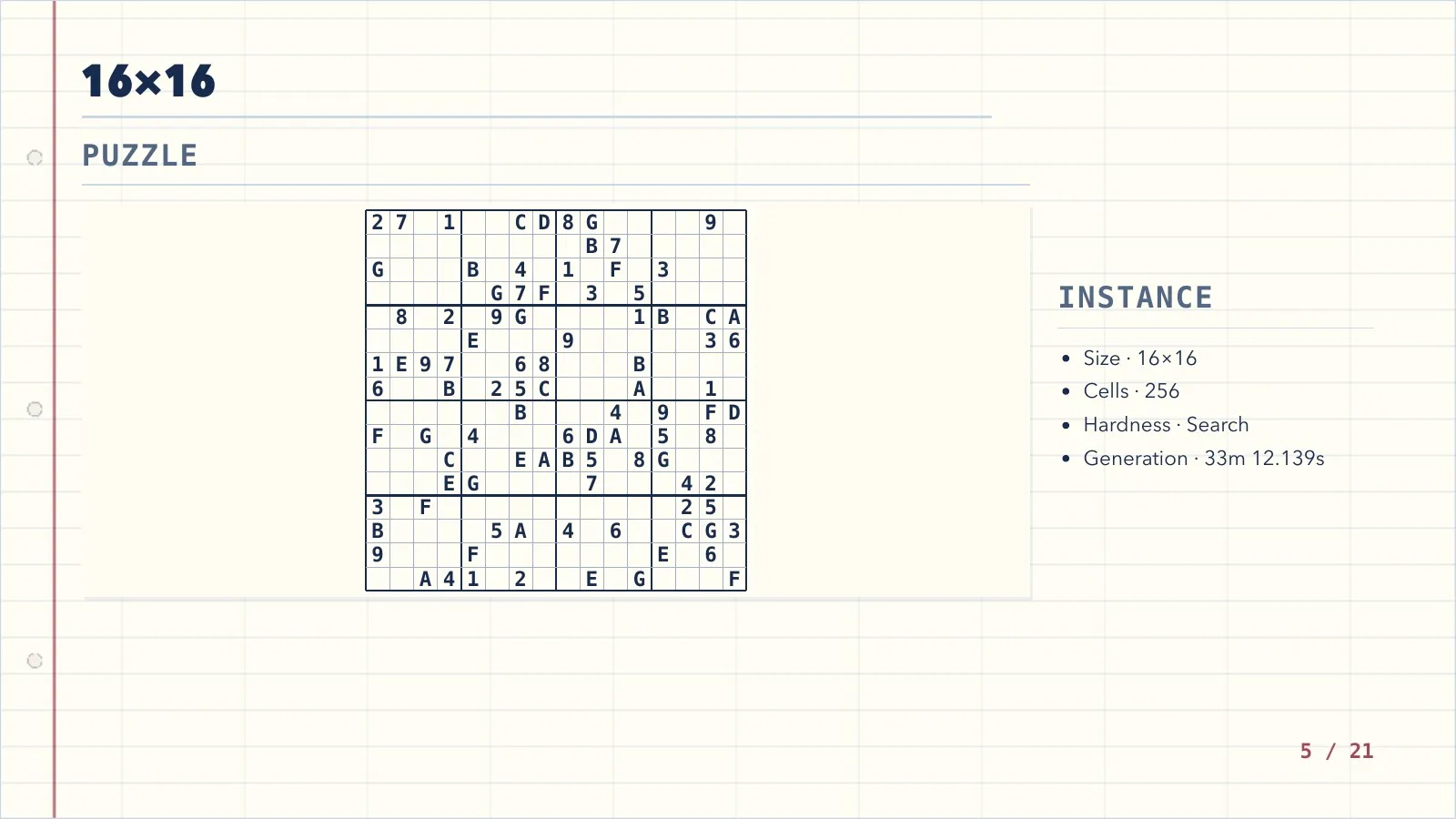
Scaling Sudoku: a puzzle and its experimental notes on a notebook page.
Propagation Algorithms for the Minimum-Distance Constraint over Selected Points studies how a constraint solver can maintain a minimum distance between selected points. It compares direct propagation algorithms with an encoding that introduces a separate distance variable for each pair. With two light, skeuomorphic themes already giving the other talks the appearance of stationery and notebook pages, a dark, abstract theme provides a clear visual distinction. Dark Splash uses a dark background, bright accents, and geometric framing for this talk.
Here, the diagram explains a propagation step: once A is selected, B and D are too close to remain possible choices. Hollow circles, a filled point, and crosses distinguish the states; the orange circle marks the distance threshold. The theme provides a dark surface for the diagram, while the figure carries the algorithm’s meaning.
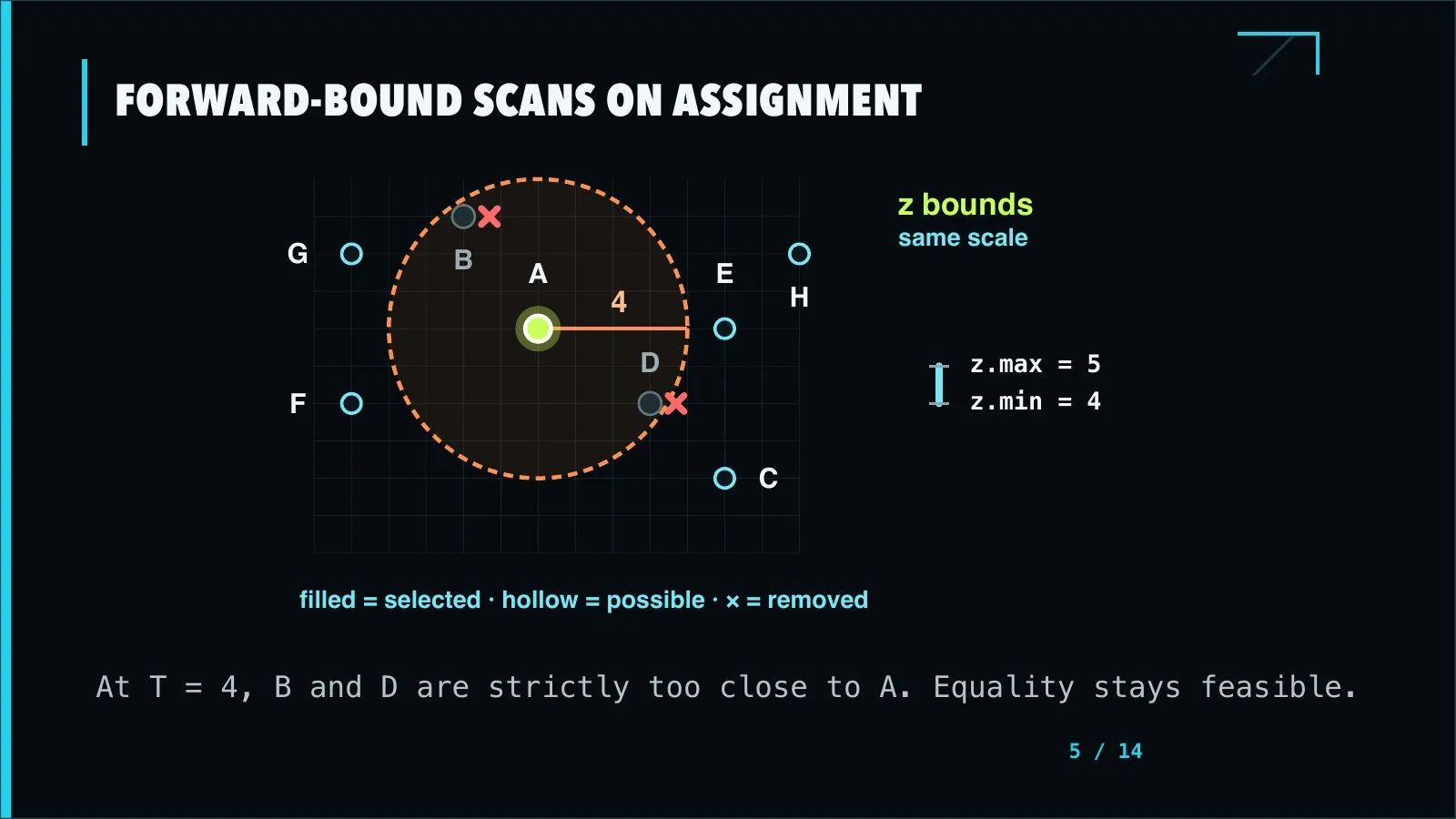
Minimum-distance propagation: the diagram shows which choices an assignment removes.
A presentation can use one of the many supplied themes, adjust its parameters, or provide a local theme package. The shared format describes the content and the role of each slide, such as a comparison or a figure. The theme determines how to compose it.
Keeping the argument and its details together
A presentation often raises questions that deserve more time than the main talk allows. Detail slides provide somewhere to keep a deep dive ready, whether it is a closer look at a process, an extended example, or the background to a decision. The main slides carry the talk forward; the details are there when the audience wants to explore further.
For example, a presentation about switching booking systems might explain what changes for customers, with a detail slide ready for questions about how existing bookings will be transferred:
# Existing bookings move with us
Customers keep their bookings and confirmation numbers.No action is needed from them.
--
## Detail: how bookings are transferred
1. Copy existing bookings into the new system.2. Check dates, customer details, and confirmation numbers.3. Resolve any mismatches before opening the new system.
The -- introduces a detail slide attached to the preceding main slide. In the interactive presentation, I can visit it when needed and return to the main talk. PDF export puts each detail slide after its main slide, so the supporting material stays with the argument it explains.
The source also holds mathematical notation, code, figures, and speaker notes. For the wedding comparison shown above, it describes a primary and a supporting side, each with a label and a list. The Wedding theme turns those into the two cards. I can edit the wording or move the slide without maintaining that layout as hand-written HTML.
Editing and reviewing
The browser preview watches the source, local assets, and theme files. Diagnostics point back to the source, and an invalid edit leaves the last valid deck visible while I fix it.
Keeping the presentation as text in Git also makes it practical to work with coding agents. For example, moving an explanation into a detail slide is a source edit I can inspect in a diff. The agent can then render the changed presentation for review.
The diff only tells me what changed in the source. I still need to look at the slides: a comparison may become unbalanced after a wording change, or a figure may leave too little room for its explanation. zpres exports PNG and JPEG pages as well as contact sheets. Individual pages let me inspect the content at presentation size; a contact sheet makes repeated layouts and changes in visual density easier to see across the talk.
Presenting and sharing
The audience view goes on the projector, while the speaker view stays on my laptop. The speaker view is served on another port of the same local zpres web server. The two views are synced, so navigating in either updates the other. The speaker view adds the current and next slides, notes, a clock, and an elapsed-time timer.
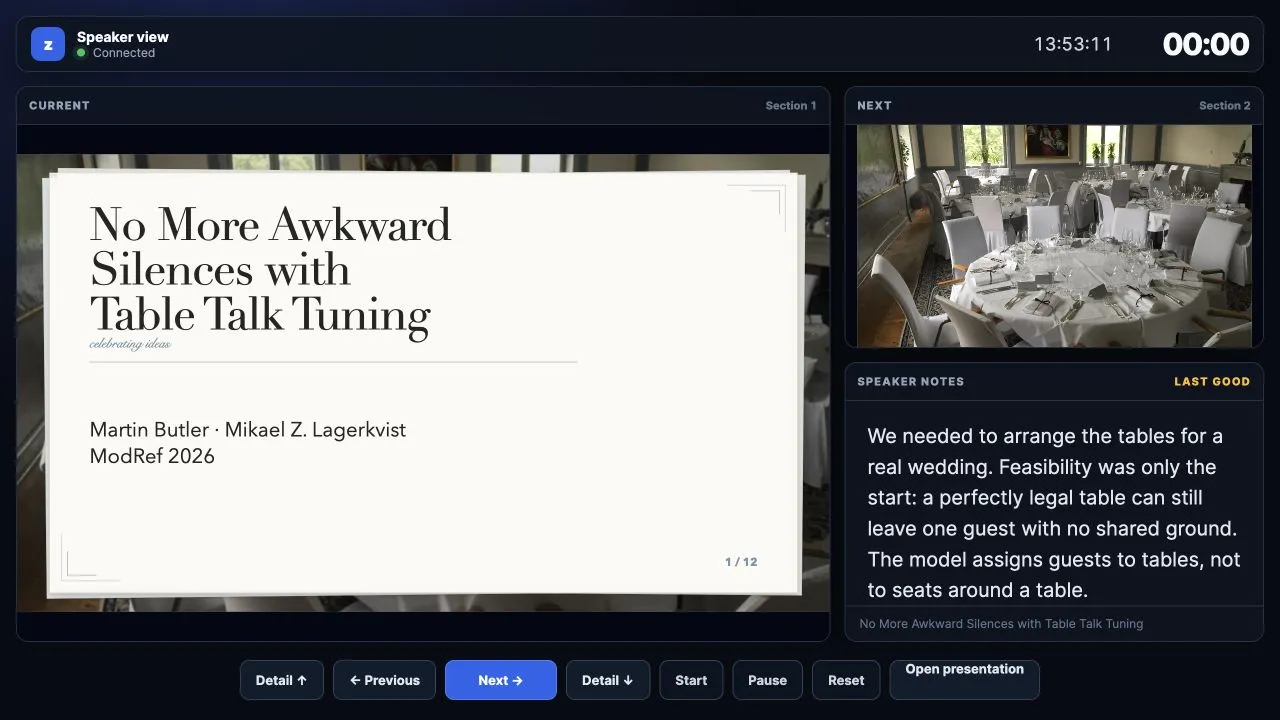
The speaker view, with notes and timing information alongside the slides.
For sharing, zpres builds an HTML presentation that works offline. Speaker notes are included by default; --exclude-speaker-notes leaves them out when building a public copy in a fresh output directory.
I also want a PDF I can present from if the venue setup is unreliable. Exporting it requires Chrome or Chromium, but the finished file can be opened in a PDF viewer. That gives me another way to present the same talk without maintaining a separate deck.
Trying zpres
Version 0.1.0 is available from crates.io:
cargo install zpres --lockedCreate a presentation in your working directory and preview it with the Science theme:
zpres init talk.zp.md --title "My talk" --author "Your name"zpres serve talk.zp.md --theme scienceSet theme: science in the file’s front matter to keep that choice for subsequent builds. To publish the presentation as HTML and PDF:
zpres build talk.zp.md --out dist/talk --exclude-speaker-noteszpres export talk.zp.md --pdf dist/talk.pdfThe getting started guide covers the source format and presentation controls. For complete examples, the three ModRef talk pages linked above include the interactive presentations, PDFs, and source files.